Atomizer Google Slide Template: 150 Editable Slides
Creating a professional presentation from scratch often feels like an overwhelming task, especially when you are balancing content creation with visual design. The Atomizer Google Slide Template serves as a comprehensive solution for professionals, educators, and creators who need high-quality visuals without spending hours adjusting alignment or color palettes. At its core, this template is a robust design framework that provides structure and aesthetic consistency. Rather than offering a rigid set of unchangeable slides, it functions as a flexible toolkit. With 150 total slides distributed across five distinct premade color themes, users gain access to a massive library of layouts that can be mixed, matched, and customized to fit specific narrative needs.
The primary appeal of Atomizer lies in its ability to bridge the gap between complex data and engaging storytelling. For marketers presenting quarterly results or entrepreneurs pitching to investors, the difference between a mediocre deck and a compelling one often comes down to visual clarity. This template addresses that need through handcrafted infographics and pixel-perfect illustrations that transform abstract concepts into digestible visuals. Because these elements are fully editable vector graphics rather than static images, you retain complete control over the messaging. You can adjust charts to reflect your actual data or modify icons to match your industry context, ensuring the final output remains authentic to your brand while benefiting from professional design foundations.
Understanding the 150-Slide Architecture
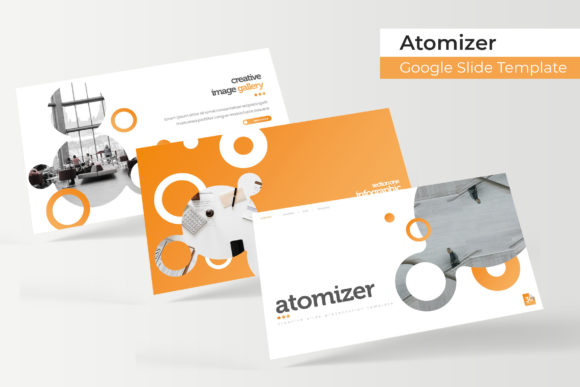
Navigating a large template library requires understanding how the content is organized. Atomizer is structured to prevent choice paralysis by dividing its 150 slides into five cohesive color variations. Each variation contains 30 unique slides, meaning you are essentially getting five complete mini-templates in one package. This organization is particularly useful for teams or individuals who manage multiple brands or projects. A freelancer might use the blue theme for corporate clients and the vibrant orange variation for creative startups, maintaining a consistent workflow while delivering distinct visual identities.
Beyond simple color swaps, the slide variety covers every stage of a presentation lifecycle. The inclusion of dedicated section break slides helps organize long-form content into logical chapters, keeping audiences oriented during extended meetings. Gallery and portfolio slides provide specialized layouts for showcasing visual work, products, or case studies without requiring custom formatting. These aren't just generic image holders; they are designed with composition and whitespace in mind to ensure photographs look their best. When combined with the resizable and editable graphic picture placeholders, users can drag and drop their own assets directly into the frame, automatically cropping and sizing them to fit the design intent.
Streamlining Workflow with Master Slides
One of the most significant time-saving features for both beginners and advanced users is the reliance on master slides. In many inferior templates, changing a font or logo requires editing slides individually. Atomizer is built correctly on master slide architecture, meaning global changes propagate instantly throughout the deck. If you decide to update your company logo or switch the header font halfway through the design process, a single edit in the master view updates all relevant slides. This drag-and-drop functionality extends to graphics and text boxes as well, allowing for rapid iteration. For busy professionals preparing for last-minute meetings, this efficiency reduces technical friction and allows more focus on refining the spoken narrative.
The handcrafted infographics deserve special attention because they solve a common pain point: explaining complex processes. Stock infographic templates often feel disconnected or overly generic. The illustrations included here are pixel-perfect and designed specifically within the PowerPoint and Google Slides ecosystem. This means every shape, line, and text label is a native object. You do not need external software like Adobe Illustrator to make meaningful edits. Whether you are mapping out a user journey, displaying a timeline, or comparing product features, these tools allow you to visualize information clearly without hiring a dedicated designer.
Practical Applications Across Industries
The versatility of the Atomizer Google Slide Template makes it suitable for a wide spectrum of users. Educators and trainers will find the section breaks and infographic slides invaluable for breaking down dense academic material into engaging lessons. The clean aesthetics help maintain student attention, while the structured layouts support pedagogical flow. Small business owners can utilize the portfolio and gallery slides to create digital lookbooks or service catalogs that double as sales presentations. The professional polish instills confidence in potential clients, signaling that the business pays attention to detail.
For bloggers and content creators repurposing written content into video essays or webinars, the template offers a ready-made visual identity. Instead of struggling with blank canvases, creators can select a color theme that matches their website branding and populate the slides with key takeaways. Entrepreneurs preparing pitch decks benefit from the data visualization capabilities, turning financial projections and market analysis into compelling visual arguments. Even hobbyists and community organizers can leverage these tools to elevate event recaps or project proposals, proving that high-end design is accessible regardless of technical skill level.
What Is Included and Important Considerations
Before downloading or purchasing, it is helpful to understand exactly what the package contains to ensure it meets your technical requirements. The Atomizer bundle includes five PPTX files optimized for standard formats and five PPTX widescreen files for modern displays. This dual-format inclusion ensures compatibility whether you are presenting on an older projector or a new 4K monitor. Additionally, a Readme First file is provided, which acts as a quick-start guide. Crucially, this documentation includes free font download links. Typography plays a massive role in design perception, and having direct access to the exact typefaces used in the preview ensures your version looks identical to the promotional materials.
A vital note for all users concerns imagery. All photographs and pictures seen in the preview are intended for illustration purposes only and are not included in the download. This is standard practice for premium templates due to licensing restrictions, but it requires preparation on your part. You should have your own high-resolution images ready to insert into the picture placeholders. Viewing this as a feature rather than a limitation is important; it forces you to use authentic visuals that genuinely represent your message rather than relying on generic stock photography that audiences have seen countless times before.
When selecting this template, consider your comfort level with basic slide editing. While Atomizer is designed to be beginner-friendly with drag-and-drop mechanics, getting the most value requires a willingness to explore the master slide view and layer management. Beginners should start by using the slides "as is" with simple text replacements before attempting major structural changes. Professionals can immediately dive into customizing the color schemes and vector graphics to align with strict brand guidelines. Ultimately, the goal is to reduce design time while increasing impact. By providing a foundation of 150 professionally crafted slides, Atomizer allows you to skip the layout phase and move straight to communication, making it a practical investment for anyone who presents regularly.