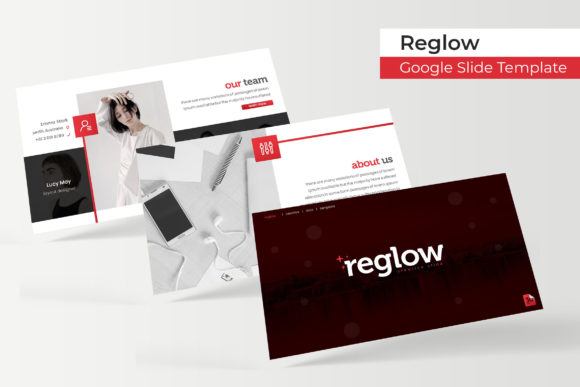
Reglow Google Slide Template: A Strategic Asset for Professional Communication
In the landscape of modern business communication, the visual quality of a presentation often serves as a proxy for organizational competence. The Reglow Google Slide Template is not merely a collection of aesthetic layouts; it is a comprehensive design system engineered to streamline the creation of high-impact presentations. For entrepreneurs, marketers, and educators, adopting a structured template like Reglow represents a strategic decision to reduce cognitive load during the design phase, allowing greater focus on narrative development and audience engagement. With 150 total slides distributed across five distinct color variations, this resource provides the scalability required for diverse professional contexts, from internal operational reviews to external client pitches.
The strategic utility of Reglow lies in its balance between creative flexibility and structural consistency. Professionals often face a dichotomy when preparing decks: spending excessive hours customizing free templates that lack cohesion, or investing heavily in bespoke agency design for recurring needs. Reglow occupies the middle ground by offering pixel-perfect illustrations and handcrafted infographics within an editable framework. This allows decision-makers to maintain brand integrity without the overhead of starting from scratch. By leveraging a pre-validated design architecture, teams can ensure that every stakeholder meeting, webinar, or report maintains a standard of excellence that reinforces trust and authority.
Leveraging Volume and Variety for Diverse Business Goals
A common pitfall in presentation planning is the limitation of scope. Many templates offer twenty or thirty slides, which suffices for a single pitch but fails when an organization needs to adapt messaging for different audiences. Reglow addresses this through its volume of 150 total slides, organized into five premade color themes with 30 unique slides per variation. This structure supports long-term operational efficiency rather than just one-off projects.
For marketing professionals, the five color variations serve a functional purpose beyond aesthetics. They allow for the segmentation of content types or sub-brands without breaking visual continuity. A primary corporate deck might utilize the core color palette, while a specific product launch or educational workshop could adopt a secondary variation to signal a shift in context to the audience. This subtle psychological cue helps manage audience expectations and improves information retention. Furthermore, having 30 dedicated slides per color set ensures that users are not forced to duplicate and awkwardly modify layouts to fit new content. Instead, they can select purpose-built slides that align with their specific communication goals, whether that involves data visualization, storytelling, or portfolio showcasing.
Strategic Application of Handcrafted Infographics
Data translation is frequently where presentations fail. Complex information presented as raw text or generic charts leads to disengagement. Reglow includes handcrafted infographics designed specifically for PowerPoint and Google Slides environments. These are not static images; they are resizable and editable graphic elements built on master slides. This distinction is critical for accuracy and agility.
When utilizing these infographics strategically, consider the narrative arc of your data. Do not simply insert a chart because it looks visually appealing. Select infographic styles that match the relationship you are trying to demonstrate—be it comparison, process flow, hierarchy, or timeline. Because these graphics are vector-based and fully editable, you can adjust them to reflect precise metrics without losing resolution. This capability transforms the template from a decorative shell into a dynamic reporting tool. For consultants and analysts, this means being able to update quarterly reports in minutes rather than days, ensuring that stakeholders always have access to current, visually coherent intelligence.
Enhancing Workflow Through Master Slides and Placeholders
Efficiency in presentation design is largely determined by how well a file utilizes master slides. Reglow is built with a robust master slide architecture that governs typography, spacing, and element positioning. For teams collaborating on a single deck, this centralized control prevents the "frankenstein" effect where individual contributors apply inconsistent formatting. When a user drags and drops content into a designated picture placeholder, the template automatically enforces alignment and cropping rules. This automation preserves the pixel-perfect integrity of the original design while accommodating unique content.
This technical foundation has significant implications for productivity and brand governance. Small business owners and freelancers operating without dedicated design staff can produce agency-quality work by relying on these embedded guardrails. Educators and trainers can create modular course materials that remain visually consistent across semesters, reducing preparation time and enhancing the learning experience. However, maximizing this benefit requires discipline. Users must resist the urge to break master slide links for minor adjustments. Doing so undermines the systemic efficiency of the template. Strategic use involves working within the system to achieve speed and consistency, reserving manual overrides only for truly exceptional circumstances.
Portfolio and Gallery Slides as Positioning Tools
The inclusion of dedicated gallery and portfolio slides makes Reglow particularly valuable for creatives, agencies, and B2B service providers. These sections are often the most scrutinized parts of a proposal or capability statement. A poorly formatted portfolio can diminish the perceived value of excellent work. Reglow’s portfolio layouts are designed to let imagery breathe while maintaining typographic hierarchy.
When approaching these slides, treat them as curated exhibitions rather than exhaustive archives. Use the drag-and-drop placeholders to showcase only the most relevant case studies that align with the prospective client’s industry or challenges. The section break slides included in the template provide necessary pacing, allowing you to transition smoothly between general capabilities and specific proof points. This deliberate structuring guides the viewer’s attention and creates a persuasive narrative flow. For publishers and bloggers repurposing written content into visual formats, these gallery layouts offer a sophisticated method for highlighting key articles or visual essays, extending the reach of intellectual property into new channels.
Risk Mitigation and Intentional Implementation
While Reglow offers substantial advantages, relying on any template without clear intent carries risks. The primary danger is prioritizing form over substance. A beautiful slide deck cannot compensate for a weak strategy or unclear value proposition. Before opening the file, define the specific objective of the presentation. What action should the audience take? What belief must change? Only after these questions are answered should you select slides from the Reglow library. Using the template as a crutch for undefined thinking results in polished but hollow communications that fail to drive results.
Another consideration is asset management. It is vital to note that all photographs or pictures used in the preview are not included; they are intended for illustration purposes only. Failing to plan for high-quality imagery can lead to last-minute compromises that degrade the template’s premium feel. Strategically, this means budgeting time and resources for sourcing appropriate stock photography or commissioning custom visuals that complement the Reglow aesthetic. Additionally, while the template includes free font download links, organizations with strict IT security policies should verify font licensing and compatibility before deployment. Ensuring that all team members have installed the correct typefaces prevents rendering issues during live presentations.
Maximizing Long-Term Value and Adaptability
To extract maximum ROI from Reglow, view it as a living design system rather than a disposable project file. The inclusion of five PPTX files and five widescreen variants ensures compatibility across different display environments and software versions. Save a master copy of each color variation as a baseline. Create derivative copies for specific projects, preserving the original for future use. Document any customizations made to the master slides so that institutional knowledge is retained even if personnel changes occur.
Furthermore, leverage the Readme First documentation included with the template. This guide often contains hidden efficiencies and usage tips that accelerate onboarding. For teams transitioning from other tools, understanding the specific logic of Reglow’s layout engine prevents frustration and rework. Over time, the familiarity gained with this system compounds. Creating a new deck becomes faster, feedback cycles shorten because reviewers know what to expect, and the organization develops a recognizable visual voice. In this way, Reglow supports not just individual presentations, but the broader maturation of organizational communication capabilities.
Ultimately, the decision to use Reglow Google Slide Template should be grounded in a desire for sustainable quality. It is best suited for professionals who understand that design is a multiplier of message clarity. By providing a rigorous yet flexible framework, it removes the friction of visual production, enabling leaders and creators to direct their energy toward strategy, connection, and impact. Whether pitching investors, teaching complex concepts, or showcasing creative work, the intentional application of this template facilitates better decisions and superior outcomes. Success depends less on the number of slides available and more on the thoughtful selection and adaptation of those assets to serve a defined human purpose.