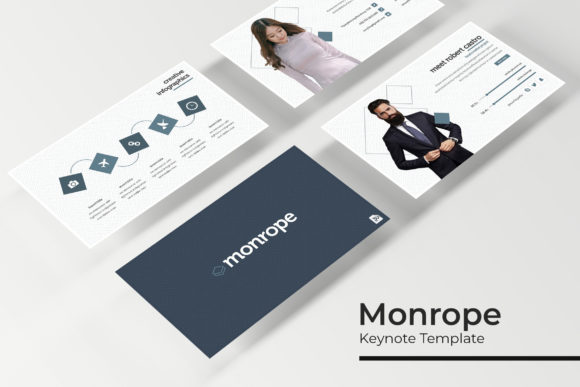
Monrope Keynote Template: Elevating Professional Presentations with Versatile Design
In the fast-paced world of professional communication, the difference between a forgettable meeting and a compelling narrative often lies in visual execution. Professionals across industries face a common dilemma: they possess valuable data and strategic insights but lack the time or design expertise to translate those concepts into visually engaging slides. The Monrope Keynote Template addresses this specific friction point by providing a comprehensive, pre-structured design system that bridges the gap between raw content and polished presentation. Rather than starting from a blank canvas, users can leverage a robust framework designed to enhance clarity, maintain brand consistency, and significantly reduce production time.
Overcoming Common Presentation Challenges
Creating high-stakes presentations involves more than just arranging text and images. Business professionals, educators, and creatives frequently encounter several obstacles that hinder effective communication. The most prevalent challenge is time management; designing custom infographics and consistent layouts from scratch can consume dozens of hours that should be spent refining the actual message. Additionally, maintaining visual consistency across a large deck is difficult without a unified master slide system, often resulting in disjointed slides that distract the audience.
Another significant hurdle is the visualization of complex data. Abstract concepts and dense statistics require specialized graphic treatment to be digestible, yet many presenters resort to generic bullet points because custom illustration is outside their skillset. The Monrope Keynote Template solves these issues by offering a library of handcrafted assets and structured layouts. By utilizing a template with 150 total slides, users eliminate the paralysis of choice and the technical burden of design, allowing them to focus entirely on storytelling and audience engagement.
A Comprehensive System for Visual Storytelling
The true value of the Monrope Keynote Template lies in its volume and organizational structure. It is not merely a collection of random slides but a cohesive ecosystem comprising 150 unique slides divided into five distinct premade color variations. This means users effectively receive five complete templates in one package, with 30 slides dedicated to each color scheme. This variety is crucial for agencies or consultants who manage multiple clients with different brand identities, or for internal teams that need to differentiate between quarterly reports, training modules, and external pitches without purchasing separate assets.
Central to this system are the handcrafted infographics. Unlike auto-generated charts, these pixel-perfect illustrations are designed with aesthetic intention, ensuring that data visualization supports rather than overwhelms the narrative. Because these graphics are built directly within PowerPoint and Keynote using native shapes and vectors, they remain fully resizable and editable. Users can adjust colors, scale elements, and modify text without experiencing the pixelation or formatting breaks often associated with imported image files. This level of editability ensures that the template adapts to your content, rather than forcing your content to fit rigid constraints.
Practical Applications and Workflow Integration
Implementing the Monrope Keynote Template streamlines the workflow for various professional scenarios. For marketing teams launching a new product, the gallery and portfolio slides provide an immediate solution for showcasing high-resolution imagery and case studies. These sections are designed with picture placeholders that utilize drag-and-drop functionality, making it effortless to swap preview images with final assets while maintaining perfect alignment and aspect ratios. This feature is particularly useful for creative directors who need to iterate quickly during review cycles.
For corporate trainers and HR professionals, the section break slides serve as essential pacing tools. Long-form educational content requires clear visual markers to help audiences mentally organize information. The included section breaks in Monrope are designed to signal transitions smoothly, preventing cognitive overload. Furthermore, the inclusion of five PPTX widescreen files alongside standard formats ensures compatibility across different display environments, from modern conference room screens to older projector setups. This cross-format reliability eliminates technical anxiety before important presentations.
Customization and Brand Alignment
One of the primary concerns when using any pre-made asset is the fear of looking generic. However, the Monrope Keynote Template is engineered for deep customization through its Master Slide architecture. Changes made to the master slides propagate instantly throughout the deck, allowing for global adjustments to fonts, logos, and footer information in seconds. This is vital for organizations with strict brand guidelines. Instead of manually updating 150 individual slides, a user can update the master once and achieve instant compliance.
The five premade color palettes act as a starting point rather than a limitation. Design-savvy users can use these combinations as inspiration to build custom themes, while non-designers can rely on them as professionally tested schemes that guarantee readability and contrast. The inclusion of a Readme file with free font download links further removes barriers to entry, ensuring that the typography matches the designer’s original vision without requiring expensive licensing. This attention to detail demonstrates a user-first approach, acknowledging that a template is only useful if all its dependencies are accessible.
Tailoring the Experience to Different User Needs
Different professionals will leverage the Monrope Keynote Template in unique ways based on their specific outcomes. A startup founder pitching to investors might prioritize the infographic-heavy slides to demonstrate market traction and financial projections, utilizing the clean aesthetics to convey stability and professionalism. In contrast, a university lecturer might focus on the text-and-image combination slides to balance theoretical explanations with visual examples, using the section breaks to delineate lecture modules.
Agencies and freelancers represent another key user segment. For these professionals, the template serves as a scalable production tool. The ability to switch between five color variations allows a single designer to produce distinct decks for multiple clients in a fraction of the time. The pixel-perfect nature of the illustrations also means that deliverables look bespoke and high-end, protecting the agency's reputation for quality. It is important to note, however, that while the template provides the structural and graphical assets, photographs used in previews are for illustration purposes only. Users must supply their own imagery, which actually encourages greater authenticity and relevance in the final output.
Making the Most of Your Presentation Assets
To maximize the return on investment when using the Monrope Keynote Template, users should adopt a content-first mindset. Before opening the file, outline the narrative arc and identify which of the 150 slides best support each key message. Avoid the temptation to use slides simply because they look attractive; every layout should serve a functional purpose in guiding the audience toward a conclusion. Utilize the gallery slides for evidence and proof points, and reserve the bold typographic slides for emotional hooks or major takeaways.
Additionally, take advantage of the editable graphic placeholders to create custom iconography or simplified diagrams that match the template’s style. Since the vector elements are native, you can deconstruct existing infographics to understand how they were built, applying those techniques to create new slides that feel indistinguishable from the originals. This extensibility transforms Monrope from a static product into a dynamic design education tool. By understanding the underlying logic of the master slides and color variations, users not only improve their current presentation but also develop better design habits for future projects.
Ultimately, the goal of any presentation resource is to remove technical friction so that ideas can shine. The Monrope Keynote Template succeeds by combining massive volume with meticulous craftsmanship. Whether you are presenting quarterly earnings, teaching a workshop, or pitching a creative concept, this system provides the visual vocabulary necessary to communicate with confidence and clarity. By handling the heavy lifting of layout and design, it frees you to do what matters most: connecting with your audience and driving meaningful action.