Mastering Professional Presentations with the Taftco Power Point Template
In the modern landscape of business, education, and creative communication, the ability to convey information visually is just as critical as the content itself. Whether you are pitching a startup idea, delivering a quarterly report, or teaching a complex academic concept, your presentation deck serves as the visual anchor for your audience’s attention. However, creating high-quality slides from scratch is a time-consuming process that often distracts from message development. This is where premium resources like the Taftco Power Point Template bridge the gap between professional design standards and practical usability.
The Taftco template is not merely a collection of backgrounds; it is a comprehensive presentation ecosystem designed to streamline workflow while maintaining pixel-perfect aesthetics. Understanding how to leverage such a robust tool can transform the way you approach visual storytelling, allowing you to focus on narrative rather than formatting. In this guide, we will explore the features, structure, and practical applications of the Taftco template suite, helping both beginners and experienced presenters maximize their impact.
Understanding the Scope: 150 Slides of Strategic Content
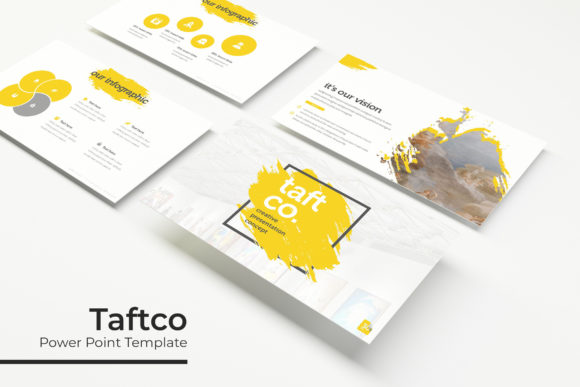
One of the most defining characteristics of the Taftco Power Point Template is its sheer volume and organization. The package includes 150 total slides, but quantity alone does not equate to quality. What makes this template distinct is how these slides are categorized and structured. Rather than offering 150 variations of the same title slide, Taftco provides a diverse array of layouts tailored to specific communicative needs.
For general readers and professionals alike, it is important to understand that a large slide library serves a strategic purpose. It anticipates the various phases of a presentation. You might need a bold opening statement, followed by data visualization, then a team introduction, and finally a portfolio showcase. Having pre-designed options for each scenario ensures visual consistency throughout the deck. This consistency builds trust with your audience, as disjointed or mismatched slides can subconsciously signal a lack of preparation or professionalism.
The Five-Color Variation System
Brand identity is paramount in professional presentations. A common misunderstanding about templates is that they force you into a rigid color scheme that may clash with your corporate guidelines. Taftco addresses this through its 5 premade color variations. With 30 slides dedicated to each color theme, users have immediate access to five distinct moods without needing advanced graphic design skills.
This feature is particularly significant for agencies or freelancers who manage multiple clients. Instead of manually adjusting hex codes across hundreds of elements, you can simply select the PPTX file that matches the client’s branding. For internal business use, these variations allow different departments to maintain a unified structural style while distinguishing their content through color coding. This flexibility ensures that the template adapts to your brand, rather than forcing your brand to adapt to the template.
Handcrafted Infographics and Visual Data Storytelling
Data is the backbone of persuasive presentations, yet raw numbers often fail to engage audiences. The Taftco template excels in this area through its handcrafted infographic in PowerPoint slides. Unlike generic chart tools that produce sterile visuals, these infographics are designed with aesthetic intentionality. They transform abstract statistics into digestible, memorable visuals.
From an educational standpoint, this aligns with cognitive load theory. When information is presented visually alongside verbal explanations, retention rates improve significantly. Taftco’s infographics are not static images; they are fully editable vector graphics within PowerPoint. This means you can change percentages, update labels, and adjust colors directly in the software without needing external programs like Adobe Illustrator. For users new to data visualization, these slides serve as excellent examples of how to balance whitespace, typography, and graphical elements to communicate complex ideas clearly.
Section Breaks and Narrative Flow
A frequently overlooked aspect of presentation design is the transition between topics. Without clear signposting, audiences can become lost in a sea of information. Taftco includes dedicated section break slides that act as visual chapter markers. These are essential for pacing and giving the audience a moment to mentally reset before absorbing new material.
Effective section breaks do more than display a title; they reinforce the narrative arc. By using consistent styling for these transitions, you create a rhythm that guides the viewer through your argument. In long-form presentations, such as training workshops or annual reviews, these slides are crucial for maintaining engagement and preventing cognitive fatigue.
Portfolio and Gallery Layouts for Creative Professionals
While many templates focus solely on corporate data, Taftco recognizes the needs of creatives, architects, photographers, and marketers. The inclusion of specialized gallery and portfolio slides makes this template versatile enough for visual-heavy industries. These layouts prioritize imagery, providing elegant frameworks for showcasing work without cluttering the screen.
These slides typically utilize grid systems and asymmetrical balances that adhere to modern design principles. For users building a personal brand or agency pitch deck, these layouts demonstrate professionalism and attention to detail. They allow the work to speak for itself while providing just enough context to frame the narrative. Understanding how to use negative space in these gallery slides is a valuable skill that transfers to other areas of digital design and web layout.
Technical Flexibility: Master Slides and Editable Assets
The true power of a premium template lies in its technical foundation. Taftco is built upon Master Slides, which is a critical concept for efficient PowerPoint usage. Master Slides act as the global blueprint for your presentation. Changes made here—such as updating a logo, changing a font, or adjusting footer placement—automatically propagate across all associated slides.
This architecture saves hours of repetitive work. Furthermore, the template features resizable and editable graphic picture placeholders with drag-and-drop functionality. Beginners often struggle with stretching images or breaking layouts when inserting their own content. Taftco’s placeholders lock the aspect ratio and positioning, ensuring that no matter what image you insert, the design remains intact. This "pixel-perfect" approach guarantees that your final output looks as polished as the original preview, even if you have limited design experience.
What Is Included in the Package
To fully utilize the Taftco Power Point Template, it is helpful to understand exactly what assets are at your disposal. The download is comprehensive and organized for ease of use:
- 5 PPTX Files: Standard format files compatible with most versions of Microsoft PowerPoint.
- 5 PPTX Widescreen Files: Optimized for modern 16:9 displays, projectors, and video conferencing platforms like Zoom and Teams.
- Readme First Documentation: Essential guidance on installation, customization, and best practices.
- Free Font Download Links: Typography plays a massive role in design. The template specifies free fonts to ensure the aesthetic is preserved without licensing issues.
It is vital to note a standard industry disclaimer: All photographs or pictures used in the preview are not included. These images are intended for illustration purposes only to demonstrate layout potential. Users must supply their own high-quality imagery to complete the presentation. This distinction ensures legal compliance and encourages users to personalize the content authentically.
Integrating Taftco into Modern Workflows
In today’s fast-paced environment, efficiency is synonymous with competence. Using a structured template like Taftco is not about cutting corners; it is about leveraging professional infrastructure to enhance communication. Whether you are a student learning to present research, a manager reporting to stakeholders, or a freelancer winning new business, the principles embedded in this template—clarity, consistency, and visual hierarchy—are universally applicable.
By understanding the features of the Taftco Power Point Template, from its 150 handcrafted slides to its master slide architecture, you gain more than just a pretty deck. You gain a framework for thinking visually. You learn how to organize information logically, how to emphasize key data points through color and layout, and how to maintain brand integrity across diverse content types. Ultimately, tools like Taftco empower you to deliver messages that are not only seen but understood and remembered, elevating your professional presence in an increasingly visual world.