Samidare Keynote Template: A Practical Asset for Professional Presentations
Creating high-impact presentations often requires a balance between aesthetic appeal and functional efficiency. For professionals who rely on Apple Keynote but need the versatility of cross-platform compatibility, the Samidare Keynote Template offers a structured solution. This asset is designed not merely as a collection of slides, but as a comprehensive design system that bridges the gap between creative expression and corporate communication. With 150 total slides distributed across five distinct color variations, Samidare provides a robust framework for entrepreneurs, educators, marketers, and business owners who need to produce polished decks without starting from scratch.
The value of a premium template lies in its ability to maintain visual consistency while allowing for deep customization. Samidare addresses this by utilizing master slides and pixel-perfect illustrations, ensuring that even significant edits do not break the underlying design logic. Whether you are pitching a startup, delivering an educational lecture, or showcasing a creative portfolio, understanding the practical mechanics of this template helps determine if it aligns with your specific workflow and presentation goals.
Structural Depth and Color Versatility
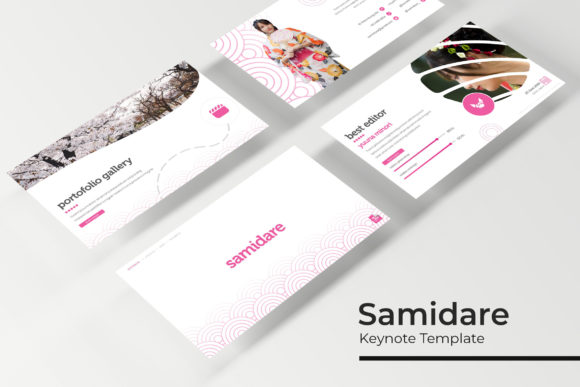
The sheer volume of content in the Samidare Keynote Template is one of its primary functional attributes. The package includes 150 unique slides, which prevents the repetitive look that often plagues standard presentation decks. Rather than offering 150 variations of the same title slide, the template is organized into five complete sets of 30 slides each. Each set corresponds to a specific premade color theme, effectively providing five separate templates in one purchase.
This structure serves a dual purpose. First, it allows users to select a color palette that matches their brand identity or the tone of the specific project. Second, it enables the creation of multiple presentations over time without reusing identical visuals. For agencies or freelancers managing multiple clients, having five distinct aesthetic directions available in a single library reduces the need to constantly source new assets. The color variations are not superficial filters; they are integrated into the master slides, meaning global changes can be applied efficiently across an entire section or deck.
Workflow Efficiency Through Master Slides
A common frustration with lower-quality templates is the inability to edit elements globally. When graphics are pasted directly onto individual slides rather than anchored to master slides, updating a logo or changing a font style requires editing dozens of slides manually. Samidare is built on a foundation of master slides, which significantly enhances long-term usability and maintenance.
This architecture ensures that the template remains flexible. Users can adjust background colors, typography, and recurring graphical elements from the master view, and those changes will propagate instantly throughout the presentation. This feature is particularly valuable for teams where multiple people may work on the same deck, as it enforces consistency and reduces formatting errors. Furthermore, the inclusion of resizable and editable graphic picture placeholders utilizes a drag-and-drop interface. This eliminates the need for complex masking or cropping tools within Keynote, streamlining the process of swapping out placeholder images for actual content.
Handcrafted Infographics and Data Visualization
Data visualization is often the weakest point in amateur presentations. Generic charts can appear disconnected from the slide’s design language. Samidare distinguishes itself with handcrafted infographics that are fully editable within PowerPoint and Keynote. These are not static images; they are vector-based constructs that allow users to modify data points, labels, and colors to match the narrative.
The practical implication here is credibility. Well-designed data presentation signals professionalism and attention to detail. Because these infographics are crafted specifically for this template, they integrate seamlessly with the surrounding layout. For business analysts, marketers presenting KPIs, or educators explaining complex concepts, this feature saves hours of custom illustration work while maintaining a high standard of visual communication.
Cross-Platform Compatibility and File Deliverables
Despite being marketed as a Keynote template, Samidare acknowledges the reality of modern collaborative environments where stakeholders may use different software. The package includes five PPTX files alongside the native Keynote files. This dual-format approach is critical for professionals who create in Keynote but must deliver to clients or colleagues using Microsoft PowerPoint.
The inclusion of widescreen (16:9) formats for both platforms ensures compatibility with modern display standards, from conference room projectors to laptop screens. However, users should be aware that while the core layouts and vectors translate well between applications, some advanced Keynote-specific animations or transitions may behave differently in PowerPoint. It is always advisable to test the PPTX version if cross-platform delivery is a requirement. The provision of dedicated PPTX files, rather than relying solely on export conversion, suggests a deliberate effort to preserve fidelity across ecosystems.
Typography and Asset Management
Visual cohesion relies heavily on typography. Samidare uses free fonts, with download links included in the Readme file. This decision removes licensing barriers and ensures that collaborators can open the file without missing font warnings. Using free, high-quality typefaces also makes the template more accessible for non-profit organizations, students, and small businesses operating with limited budgets.
It is important to note a standard limitation applicable to this and similar digital assets: photographs used in preview materials are for illustration purposes only and are not included in the download. Users must supply their own imagery. While this requires additional preparation, it ultimately results in a more authentic presentation. Relying on stock photos embedded in a template can make a deck feel generic. By forcing the user to insert relevant, proprietary imagery, the template encourages more personalized and effective storytelling.
Evaluating Real-World Applicability
Determining whether Samidare fits your needs depends on your specific role and output frequency. For freelancers and agency creatives, the five color variations offer enough diversity to serve multiple clients without purchasing separate templates for each. The master slide structure supports rapid iteration during client feedback cycles.
For educators and trainers, the section break slides and gallery layouts provide necessary pacing mechanisms. Breaking up dense information with visual pauses improves audience retention, and the portfolio-style slides are excellent for showcasing student work or case studies. The handcrafted infographics simplify the explanation of theoretical models or historical timelines.
Entrepreneurs and startup founders will find value in the pitch-ready layouts. Investors expect a certain level of polish, and the pixel-perfect illustrations convey competence. However, founders should ensure they customize the content heavily; the template provides the vessel, but the unique value proposition must come from original text and data.
Corporate professionals may appreciate the reliability of the master slides for internal reporting. Consistency in quarterly reviews or departmental updates builds brand recognition internally. The ability to update global elements means that when company branding guidelines change, the template can be updated once rather than recreated.
Considerations and Limitations
While Samidare is a comprehensive tool, it is not a magic solution. The abundance of 150 slides can be overwhelming for new users. There is a learning curve associated with navigating the master slides and understanding how the color variations are structured. Users accustomed to simple, linear templates may initially find the depth of features excessive.
Additionally, because the template is feature-rich, it carries a larger file size than basic alternatives. This is generally negligible on modern hardware but could be a consideration for users working on older machines or sharing files via restrictive email servers. Finally, while the PPTX compatibility is strong, purists who require advanced Keynote-exclusive features like Magic Move transitions may find the cross-platform constraints limiting. It is best viewed as a versatile hybrid rather than a platform-exclusive masterpiece.
Final Assessment of Value
The Samidare Keynote Template represents a mature approach to presentation design. It prioritizes structural integrity and workflow efficiency over fleeting trends. By combining a high volume of slides with a robust master slide system and cross-platform support, it serves as a reliable utility for serious presenters. Its strength lies in its adaptability; it is equally suited for a creative portfolio, a data-heavy business report, or an educational seminar.
For adults aged 20–50 who produce presentations regularly, the time saved in layout design and the assurance of professional aesthetics justify the investment. The key to maximizing its value is to treat it as a design system rather than a static product. Engage with the master slides, utilize the color variations strategically, and replace placeholders with meaningful content. When used with intention, Samidare elevates the presentation process from a chore to a strategic advantage, allowing the creator to focus on narrative and impact rather than pixel alignment.