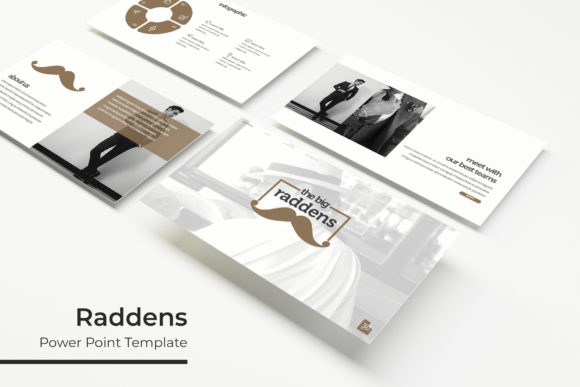
Raddens Power Point Template: 150 Slides for Impact
Creating a presentation that balances aesthetic appeal with functional clarity is one of the most common challenges for modern professionals. Whether you are pitching to investors, teaching a complex subject, or showcasing a creative portfolio, the visual framework matters as much as the content itself. The Raddens Power Point Template addresses this need by providing a comprehensive design system rather than just a collection of disjointed slides. With 150 total slides organized into five distinct premade color variations, this template offers enough structural variety to handle multiple projects without requiring users to start from scratch or hire a dedicated designer for every new deck.
The primary advantage of using a robust system like Raddens lies in its scalability. Many templates offer twenty or thirty slides that quickly become repetitive when applied to longer narratives. By providing 30 unique slides for each of the five color themes, Raddens ensures that your visual language remains fresh throughout an extended presentation. This depth is particularly valuable for agencies, educators, and consultants who frequently produce content-heavy decks but need to maintain a consistent brand identity across different topics and audiences.
Design Architecture and Visual Consistency
The foundation of any effective presentation template is its adherence to professional design principles. Raddens distinguishes itself through pixel-perfect illustrations and handcrafted infographics that are built directly within PowerPoint. Unlike templates that rely on flattened images or external vector software, these graphics are fully editable native objects. This means you can adjust colors, resize elements, and modify data visualization components without leaving the application or losing resolution. For marketers and business owners, this level of editability transforms static templates into dynamic communication tools that can adapt to specific branding guidelines.
Visual consistency is maintained through a rigorous master slide structure. Every layout, from section breaks to gallery views, is anchored to a central design logic. This prevents the common issue where modified slides drift away from the original style guide after several rounds of editing. When you utilize the drag-and-drop picture placeholders, the aspect ratios and alignment guides ensure that your content snaps into place cleanly. This attention to detail reduces the time spent manually adjusting text boxes and image frames, allowing creators to focus on narrative flow rather than pixel pushing.
Practical Applications Across Industries
Versatility is a key metric when evaluating digital assets. The Raddens Power Point Template is engineered to serve diverse use cases beyond standard corporate reporting. The inclusion of dedicated portfolio and gallery slides makes it an excellent choice for photographers, architects, and designers who need to showcase visual work in a structured format. These layouts prioritize negative space and image hierarchy, ensuring that the artwork remains the focal point while the supporting text enhances rather than distracts.
In educational and training environments, the handcrafted infographic slides serve a critical function. Complex processes, statistical data, and hierarchical information can be visualized instantly using pre-designed diagrams. Educators and trainers can swap out placeholder text with course-specific content while retaining the cognitive scaffolding provided by the design. Similarly, entrepreneurs preparing pitch decks benefit from the section break slides, which provide clear visual cues that help guide investors through a business model or market analysis. The ability to switch between five distinct color palettes also allows freelancers and agencies to tailor the mood of the presentation to match client preferences or industry standards without rebuilding the deck.
Workflow Efficiency and Technical Specifications
Time is often the most constrained resource in presentation design. Raddens streamlines the production process through several technical features aimed at usability. The package includes both standard and widescreen PPTX files, ensuring compatibility across older projectors and modern high-definition displays. This dual-format inclusion eliminates the frustration of aspect ratio distortion during live presentations. Furthermore, the template utilizes free fonts with download links included in the Readme file. This removes licensing barriers and ensures that typography renders correctly on any machine, preventing the formatting errors that often occur when sharing files between teams.
The organizational structure of the template further enhances productivity. With 150 slides categorized logically, users can locate the exact layout needed for a specific purpose without scrolling through hundreds of irrelevant options. The master slide integration means that global changes—such as updating a logo or changing a background accent color—can be applied across multiple slides simultaneously. This feature is invaluable for maintaining brand compliance in large organizations or for freelancers managing multiple client identities. The resizable graphic elements also future-proof the asset; as display technologies evolve, vector-based components scale without degradation.
Evaluating Fit and Implementation Strategy
While Raddens offers significant capabilities, prospective users should approach implementation with realistic expectations. It is important to note that all photographs and pictures used in the preview are for illustration purposes only and are not included in the download. Users must have their own library of high-quality imagery to achieve the polished look demonstrated in the marketing materials. This separation of design and content is standard practice, but it requires users to invest time in sourcing appropriate visuals that complement the template’s aesthetic.
When selecting this template, consider your long-term content strategy. If you primarily create short, ten-slide updates, the full scope of Raddens may be more than necessary. However, if you anticipate producing varied content types—from detailed reports to visual portfolios—the investment pays dividends through reduced design friction. Professionals should also assess their comfort level with PowerPoint’s master slide functionality. While the template is designed for ease of use, unlocking its full potential requires a basic understanding of how parent-child slide relationships work. Taking fifteen minutes to explore the master view before starting a project can save hours of troubleshooting later.
For teams adopting Raddens as a standard organizational asset, establishing usage guidelines is recommended. Define which color variation corresponds to which department or content type to prevent brand dilution. Create a shared repository of approved images that fit the placeholder dimensions to speed up future deck creation. By treating the template as a living design system rather than a disposable backdrop, organizations can achieve a level of visual professionalism that typically requires ongoing design support. The combination of extensive slide variety, native editability, and thoughtful structural organization makes Raddens a practical solution for anyone seeking to elevate their presentation workflow without sacrificing efficiency.