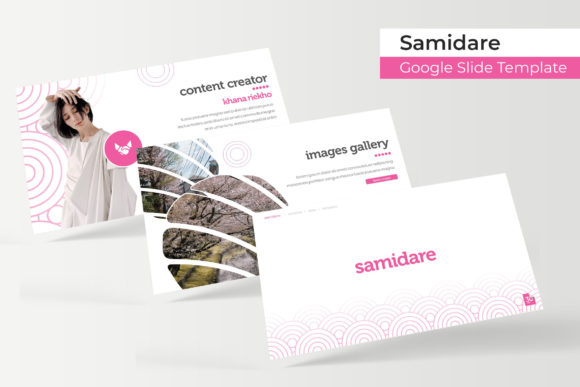
Samidare Google Slide Template: Design & Features
Creating a presentation that balances aesthetic appeal with functional clarity is often the most time-consuming part of project planning. The Samidare Google Slide Template addresses this bottleneck by providing a comprehensive design system rather than just a collection of disconnected layouts. For professionals, educators, and creators who need to communicate complex ideas without spending hours on graphic design, this template serves as a foundational toolkit. It streamlines the visual creation process, allowing you to focus entirely on narrative structure and content delivery while maintaining a polished, professional appearance throughout your deck.
A Comprehensive Library of 150 Handcrafted Slides
The primary strength of the Samidare Google Slide Template lies in its sheer volume and variety. With 150 total slides at your disposal, it eliminates the repetitive cycle of duplicating and modifying basic layouts. This extensive library is organized into five distinct premade color themes, with 30 unique slides dedicated to each variation. This structure ensures that whether you are building a minimalist corporate report or a vibrant creative portfolio, you have specific assets tailored to that visual identity.
Unlike generic templates that rely heavily on stock photography, Samidare emphasizes handcrafted infographics and pixel-perfect illustrations. These elements are fully editable vector graphics, meaning they remain crisp at any resolution and can be customized to match your specific data points. This distinction is crucial for business owners and marketers who need to visualize statistics, workflows, or timelines without resorting to external design software. The ability to manipulate these graphics directly within the slide environment significantly reduces production time and maintains visual consistency across different sections of your presentation.
Master Slide Architecture for Global Efficiency
Efficiency in presentation design often comes down to how well the underlying architecture supports rapid editing. Samidare is built upon a robust Master Slide framework. This technical foundation allows for global changes across multiple slides simultaneously. If you need to update a logo, adjust a footer, or change a background element across an entire section, you can do so via the master view rather than formatting individual slides one by one.
This feature is particularly valuable for teams and agencies managing multiple client accounts. It ensures brand compliance and reduces the margin for error when updating decks. Furthermore, the template includes dedicated Section Break slides that help organize long presentations into digestible chapters. These transitions are not merely decorative; they serve a cognitive function, signaling shifts in topic to your audience and improving information retention during lengthy meetings or lectures.
Practical Applications Across Professional Sectors
The versatility of the Samidare Google Slide Template makes it applicable across a wide spectrum of use cases. Understanding how to leverage its specific features for different audiences can maximize your return on investment.
- Corporate Reporting and Pitch Decks: Entrepreneurs and executives can utilize the data-heavy infographic slides to present quarterly results or investment opportunities. The clean lines and professional color palettes convey stability and competence, while the editable charts allow for precise data representation.
- Creative Portfolios and Agency Showcases: Freelancers and designers benefit from the dedicated Gallery and Portfolio slides. These layouts are designed to highlight visual work with ample whitespace and balanced typography, ensuring that the artwork remains the focal point rather than competing with busy background elements.
- Educational Courseware and Workshops: Educators and trainers can use the varied layout options to maintain student engagement over long sessions. The mix of text-heavy explanation slides and visual summary slides helps cater to different learning styles, while the section breaks provide natural pauses for Q&A or discussion.
- Marketing Campaigns and Product Launches: Marketers can leverage the bold color variations to align presentations with specific campaign branding. The drag-and-drop picture placeholders make it easy to swap in product shots or lifestyle imagery without breaking the layout grid.
Streamlining Workflow with Drag-and-Drop Functionality
One of the most practical aspects of using Samidare is the intuitive drag-and-drop functionality integrated into the picture placeholders. In many presentation tools, inserting images often requires manual cropping, resizing, and alignment to prevent distortion. Samidare’s placeholders automate this process. You simply drop your image into the designated frame, and it instantly snaps to the correct aspect ratio and position.
This seemingly small detail has a massive impact on productivity, especially when iterating on feedback. If a stakeholder requests a photo change minutes before a meeting, you can execute the swap instantly without worrying about breaking the slide's composition. Combined with the resizable graphic elements, this ensures that even non-designers can produce high-quality visuals under tight deadlines. The template effectively bridges the gap between professional design standards and everyday usability.
Technical Specifications and Included Assets
When evaluating digital assets, understanding exactly what is delivered is essential for seamless implementation. The Samidare package is structured to provide maximum compatibility and ease of use. Upon purchase, users receive five PPTX files and five widescreen PPTX versions, ensuring compatibility across different display ratios and older versions of PowerPoint. This dual-format inclusion prevents the common issue of stretched or cropped content when presenting on varying hardware.
Additionally, the package includes a comprehensive Readme First file containing direct download links for all free fonts used in the template. Typography is a critical component of visual hierarchy, and having immediate access to the correct typefaces prevents the "missing font" errors that often plague shared presentations. It is important to note, however, that all photographs and pictures used in the preview materials are for illustration purposes only and are not included in the download. Users must supply their own imagery, which actually encourages customization and prevents the generic look associated with stock-inclusive templates.
Making the Most of Color Variations
The five premade color schemes included in Samidare are not just superficial filters; they are curated palettes designed to evoke specific moods and suit different industries. When selecting a starting point, consider the psychological impact of color on your specific audience. A financial advisor might opt for the cooler, more restrained palette to suggest trust and stability, while a tech startup might choose a higher-contrast variation to signal innovation and energy.
Because these colors are applied through the master slides and theme settings, switching between them is a low-risk experiment. You can duplicate your working file and test two different colorways side-by-side to see which best supports your narrative. This flexibility allows the Samidare Google Slide Template to adapt to your evolving brand guidelines without requiring a complete redesign. By treating the template as a dynamic system rather than a static product, you ensure that your presentations remain fresh, relevant, and visually aligned with your communication goals.
Ultimately, the value of this template extends beyond its 150 slides. It offers a structured approach to visual communication that respects both the creator's time and the audience's attention. Whether you are pitching to investors, teaching a class, or showcasing creative work, Samidare provides the professional scaffolding necessary to deliver your message with confidence and clarity. By leveraging its master slide architecture, handcrafted infographics, and intuitive editing features, you transform the often-dreaded task of slide creation into a streamlined, strategic part of your workflow.